There are three ways to get a peek at how pre-existing content looks on a theme: use a theme changer or a theme previewer on the blog’s current location, or install a copy of the content’s database in an alternate location. For some projects, setting up a theme switcher or preview utility can be a nice early step in developing a theme.
Today I’m looking at four plugins – one theme changer and three theme previewers. Each method has advantages and disadvantages. In my case a theme changer was the best choice, because I want to share the effect of design changes with my readers.
A WordPress Theme Changer Plugin
Why use a theme changer?
- Allow clients to compare “live” design alternatives
- Show off a WordPress theme portfolio
- Demonstrate the impact of design changes
- Entertain blog visitors
Considerations for effective use of theme changers
- Readers may be confused. Help orient readers by putting theme changer links at the top of your sidebar, where they are easily spotted.
- Limit installed themes to the choices you want to make available to users. All installed themes may be listed by a theme switcher.
By Themebot.
Last Updated: 2008-2-22
Requires WordPress Version: 2.0 or higher
Compatible up to: 2.5x
Configure at Design > Widgets > Theme Switcher
WordPress Theme Switcher Reloaded is an updated version of the venerable Theme Switcher by Ryan Boren, and Theme Switcher Widget by Jared Bangs. This plugin was sponsored by Themebot and coded by kingler. The plugin is currently maintained by 72pines
Theme Switcher Reloaded
Theme Switcher Reloaded is currently in use on this blog. Those who install first and read directions later may have a confuzzled moment when looking in “Settings” for setup options. It’s not there. You need to activate the sidebar widget in Design > Widgets. After that, changing themes is extremely quick – I saw no noticeable difference in load speed, even when tested on dialup.
Theme names are appended to the blog’s root URL: http://yoursite.com/index.php?wptheme=Your+Theme+Name.
XHTML and CSS validators understand to use the files of whatever theme is appropriate for “Your+Theme+Name” when checking this style of Theme Switcher generated URL.
Previewing a WordPress Theme
The following three plugins allow previewing of themes that are not publicly active. Unlike the sidebar widget interface utilized by the theme switcher above, theme previewers are triggered by some sort of behind the scenes action.
Why preview an inactive theme?
- Develop a theme before making it active
- Collaborate with another designer
- Scan for width-related content display issues before changing themes
- Low pressure tweaking – do that one small thing without worrying over breaking anything in public view
- Check for CSS inconsistencies – especially nice when changing from a static site with lots of inline CSS to using WordPress as a CMS
- Check for elements in need of more detailed CSS styling, especially blockquotes and lists
Considerations for effective use of theme changers
- Ease of use. How does the previewer change themes? Is it easy for you, or confusing?
- Access. Do all registered users have rights to explore alternative themes?
- Disable cache plugins. You may need to disable cache plugins before theme previewers will work.
By Vladimir Prelovac.
Last Update: May 18th, 2008
Requires WordPress Version: 2.3 or higher
Compatible up to: 2.5.1
Configure at Design > Theme Test Drive
Safely test drive any theme while visitors are using the default one.
Theme Test Drive
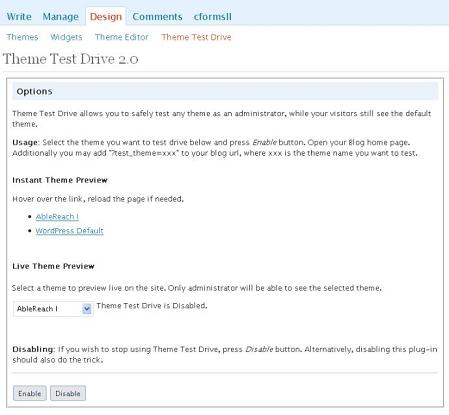
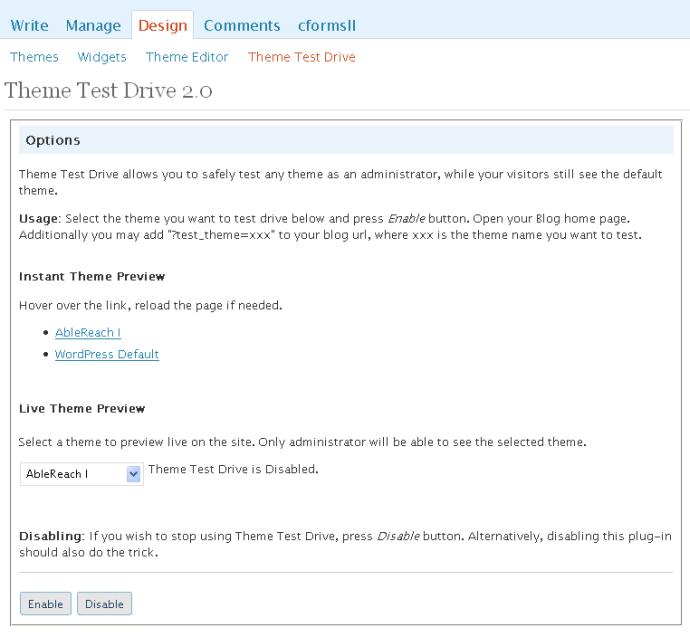
Only a blog administrator will be able to see previewed themes. Others will see the standard installed theme. I found this previewer to be easier to keep track of, because of seeing “enabled” or “disabled on the nifty thumbnail-enhanced theme preview page. This is the most idiot-proof of the theme preview plugins.
By Donncha O Caoimh.
Last Updated: 2008-4-8
Compatible up to: 2.5
Configure at Design > Theme Tester
Allow an admin to test new themes without showing your blog visitors
Theme Tester
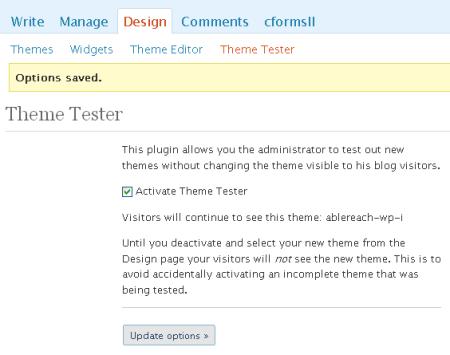
Theme Tester allows an admin to change and test new WordPress themes without worrying about showing visitors a half-finished theme. After installing the plugin, go to Design > Theme Tester to choose a theme to test. While the plugin is activated, a logged-in administrator can change themes as desired without changing the theme that regular visitors see.
Preview Theme Theme Preview Plugin Version 1.0
By Dougal Campbell.
Last Updated: 2007-10-27
Requires WordPress Version: 1.5 or higher
Compatible up to: 2.3.1 (tested here on WP 2.5.1)
Allows themes to be previewed without activation
Theme Preview Plugin
After activation, adding the query variables ‘preview_theme’ and/or ‘preview_css’ to
the current URI will change the theme that is displayed for you, without making any changes for other viewers. The trick is that you have to already know what to type. The bonus is an ability to swap out stylesheets, which can be an interesting way to go if you are working on stylesheets that can change the look of the same base theme.
Loads a theme located in the folder “my-theme”
?preview_theme=default
Loads the stylesheet from a theme located in the folder “your-theme” onto the currently installed theme
?preview_css=your-theme
Loads the “your-theme” theme, with the “my-theme” style sheet
?preview_theme=your-theme&preview_css=my-theme
I’ve used this plugin successfully on other WP 2.5.1 sites, but could not get it installed here, even after deactivating a few other plugins. If you’re into playing with your CSS, Preview Theme is very fun to use, and I’d recommend giving it a shot.
My WordPress Remodel series will continue on most Mondays and Thursdays, building towards an eBook about WordPress theme design. RSS feed subscribers will see a special link where they can register to get the ebook for free.


 WP Default has good bones and was based on
  Default will look pretty funky for a while. Image floats and widths are areas where you will see rough spots. In most browsers, too-wide images are compressed to make them fit. IE6 users will see images wider than 450px protruding into the sidebar.